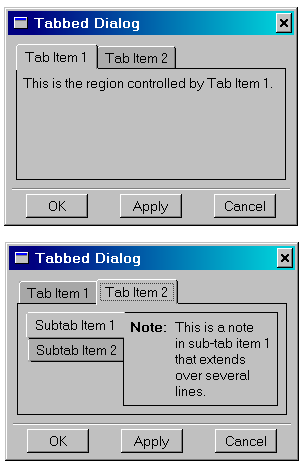
The FXTabBook widget uses “tab items” to control the display of its “pages” one at a time. FXTabBook expects that its odd-numbered children are FXTabItems and its even-numbered children are some type of layout manager. The layout manager contains whatever widgets are to be displayed in that page. Clicking a tab item will show the layout manager (and all its children) associated with that tab while hiding all the other layout managers. Typically, a horizontal or vertical frame is used for the layout manager, and its frame options are set to FRAME_RAISED | FRAME_THICK to provide a standard border.
You can nest tab books to provide tabs within tabs, as shown in the following example:
tabBook1 = FXTabBook(self, None, 0, LAYOUT_FILL_X)
FXTabItem(tabBook1, 'Tab Item 1')
tab1Frame = FXHorizontalFrame(tabBook1,
    FRAME_RAISED|FRAME_SUNKEN)
FXLabel(tab1Frame, '
    This is the region controlled by Tab Item 1.')
FXTabItem(tabBook1, 'Tab Item 2')
tab2Frame = FXHorizontalFrame(tabBook1, FRAME_RAISED|FRAME_SUNKEN)

tabBook2 = FXTabBook(tab2Frame, None, 0,
    TABBOOK_LEFTTABS|LAYOUT_FILL_X)
FXTabItem(tabBook2, 'Subtab Item 1', None, TAB_LEFT)
subTab1Frame = FXHorizontalFrame(tabBook2,
    FRAME_RAISED|FRAME_SUNKEN)
AFXNote(subTab1Frame,
    'This is a note\nin sub-tab item 1\nthat extends\n' \
    'over several\nlines.')
FXTabItem(tabBook2, 'Subtab Item 2', None, TAB_LEFT)
subTab2Frame = FXHorizontalFrame(tabBook2,
    FRAME_RAISED|FRAME_SUNKEN)
Figure 4–7 shows an example of nested tab books.