


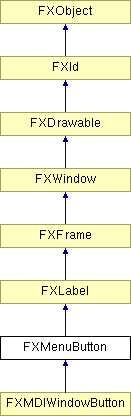
A menu button posts a popup menu when clicked. There are many ways to control the placement where the popup will appear; first, the popup may be placed on either of the four sides relative to the menu button; this is controlled by the flags MENUBUTTON_DOWN, etc. Next, there are several attachment modes; the popup's left/bottom edge may attach to the menu button's left/top edge, or the popup's right/top edge may attach to the menu button's right/bottom edge, or both. Also, the popup may apear centered relative to the menu button. Finally, a small offset may be specified to displace the location of the popup by a few pixels so as to account for borders and so on. Normally, the menu button shows an arrow pointing to the direction where the popup is set to appear; this can be turned off by passing the option MENUBUTTON_NOARROWS.
Constructor.
| Argument | Type | Default | Description |
| p | FXComposite | ||
| text | String | ||
| ic | FXIcon | None | |
| pup | FXPopup | None | |
| opts | Int | JUSTIFY_NORMAL| ICON_BEFORE_TEXT| MENUBUTTON_DOWN | |
| x | Int | 0 | |
| y | Int | 0 | |
| w | Int | 0 | |
| h | Int | 0 | |
| pl | Int | DEFAULT_PAD | |
| pr | Int | DEFAULT_PAD | |
| pt | Int | DEFAULT_PAD | |
| pb | Int | DEFAULT_PAD |
Return default height.
Reimplemented from FXLabel.
Reimplemented in FXMDIWindowButton.
Return default width.
Reimplemented from FXLabel.
Reimplemented in FXMDIWindowButton.
Set X offset where menu pops up relative to button.
| Argument | Type | Default | Description |
| offx | Int |
Set Y offset where menu pops up relative to button.
| Argument | Type | Default | Description |
| offy | Int |
Menu button options
| MENUBUTTON_AUTOGRAY | Automatically gray out when no target. |
| MENUBUTTON_AUTOHIDE | Automatically hide when no target. |
| MENUBUTTON_TOOLBAR | Toolbar style. |
| MENUBUTTON_COMBOBOX | CAE - Combobox style. |
| MENUBUTTON_DOWN | Popup window appears below menu button. |
| MENUBUTTON_UP | Popup window appears above menu button. |
| MENUBUTTON_LEFT | Popup window to the left of the menu button. |
| MENUBUTTON_RIGHT | Popup window to the right of the menu button. |
| MENUBUTTON_NOARROWS | Do not show arrows. |
| MENUBUTTON_ATTACH_LEFT | Popup attaches to the left side of the menu button. |
| MENUBUTTON_ATTACH_TOP | Popup attaches to the top of the menu button. |
| MENUBUTTON_ATTACH_RIGHT | Popup attaches to the right side of the menu button. |
| MENUBUTTON_ATTACH_BOTTOM | Popup attaches to the bottom of the menu button. |
| MENUBUTTON_ATTACH_CENTER | Popup attaches to the center of the menu button. |
| MENUBUTTON_ATTACH_BOTH | Popup attaches to both sides of the menu button. |