


A check button is a tri-state button. Normally, it is either True or False, and toggles between True or False whenever it is pressed. A third state MAYBE may be set to indicate that no selection has been made yet by the user, or that the state is ambiguous. When pressed, the check button sends a SEL_COMMAND to its target, and the message data represents the state of the check button.
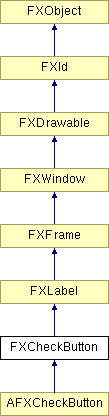
Construct new check button.
| Argument | Type | Default | Description |
| p | FXComposite | ||
| text | String | ||
| tgt | FXObject | None | |
| sel | Int | 0 | |
| opts | Int | CHECKBUTTON_NORMAL | |
| x | Int | 0 | |
| y | Int | 0 | |
| w | Int | 0 | |
| h | Int | 0 | |
| pl | Int | DEFAULT_PAD | |
| pr | Int | DEFAULT_PAD | |
| pt | Int | DEFAULT_PAD | |
| pb | Int | DEFAULT_PAD |
Returns True because a check button can receive focus.
Reimplemented from FXWindow.